Get started
What's new

How MIDMEN changes,update by update.

Newest first. The big ones get a picture and a way to try them.

Latest update

Create a report or a deck from Excel

After you publish, the Excel pane can write a Word report or a PowerPoint deck from your prompt. The file opens as a normal MIDMEN document and updates on every publish. Claude can do the same with create_document.

  • Excel
  • Word
  • PowerPoint
  • Claude

Try it

  1. Publish a version in Excel.

  2. On the Publish tab, press Create and pick Word report or PowerPoint deck.

  3. Write what it should say and press Create. The file downloads; open it in Word or PowerPoint and the MIDMEN pane picks it up.

Create uses MIDMEN's AI, so it needs an invite code or your workspace's own AI key. The AI writes the words; every number comes from the published version. Viewers cannot create documents.

How it works
The Excel pane, Publish tab, Create a report or deck: Word report chosen, the request typed, and the line saying the Word report is ready, made from version 2, with Open in Word.
Excel: Publish tab, Create (real pane, fictional Acme)

Earlier updates

Source in Excel for revenue FY26Q2: Backed by 2 sources, the PDF line and the web page.
Excel: Source, backed by 2 sources

Several sources behind one number, and Edit rule

One number can be backed by several PDFs and web pages, and Source shows each with its own tie-out. Every checked sentence has Edit rule, with a preview on the current version before it saves.

  • Attached PDFs are stored in the workspace, so Whole page and Full screen work in every app.
  • Claude's answers name every source behind a number.
  • Excel
  • Word
  • PowerPoint
  • Claude
Sources
Setup, Publish rules in Excel: presets Simple and Reviewed, and a switch for each check.
Excel: Setup, Publish rules

Publish rules for your team

Choose Simple or Reviewed. A number typed over a formula asks "This is intended" with a reason, and an editor's version can wait for a second OK.

  • Publish notices new period columns and moved cells and offers Add and publish.
  • Keep my edit in Word and PowerPoint links the numbers of a hand-edited sentence again.
  • Insert figure in PowerPoint.
  • Check any file against the model, and Link them.
  • A note on each version, and a list of numbers typed over on purpose.
  • Excel
  • Word
  • PowerPoint
  • Claude
Made for a deal team
  • The Excel status says how many numbers are cited; forecast assumptions no longer count as missing sources.
  • midmen.in is now a multi-page site.

People in this workspace: invite someone by email address with a role.
Setup, People

Add people by email

Owners add people to a workspace by email as owner, editor or viewer, from the pane or from Claude. People without an account join when they first sign in.

  • Excel
  • Word
  • PowerPoint
  • Claude

The MIDMEN pane offering the sample workspace: the Excel model, the Word report and the PowerPoint deck.
The Acme sample files

The pilot opens

Every new account gets the fictional Acme sample: a model, a report and a deck. The Office pane installs with one double-click, and invite codes unlock MIDMEN's own AI.

  • Excel
  • Word
  • PowerPoint
  • Claude
Use in Office
  • Report a problem from the pane, with screenshots and a voice note.

Model coverage in Excel with the Highlight cells without a source button.
Excel: Source, Model coverage

A cleaner pane, and Highlight cells without a source

The pane got the same simple layout in all three apps. In Excel, Highlight cells without a source selects the inputs nobody has cited yet.

  • Excel
  • Word
  • PowerPoint
  • Valuation models as they are: DCFs with actuals next to forecasts, intended circular references, sensitivity and comps grids, Monte Carlo runs.
  • A full security and correctness audit, with every serious finding fixed and tested.
  • Figures are found in tables printed sideways and across two-page spreads.

  • A public web page can back a number: MIDMEN opens the link itself and keeps the words around the figure.
  • Workspace owners can add their own Anthropic or OpenAI-compatible AI key.

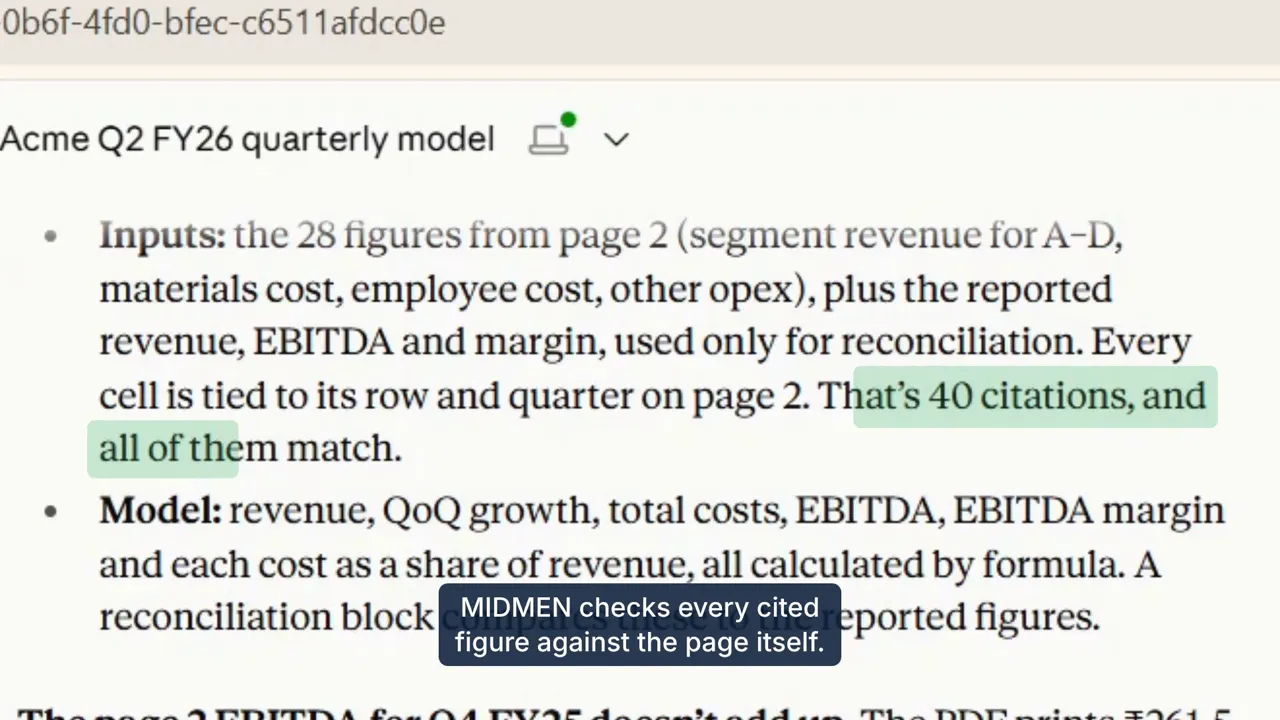
Claude in claude.ai summarising the model it built from the Acme results PDF: 40 citations, all of them match.
From the launch video, recorded in claude.ai

Claude builds, writes and stamps

Claude pushes a calculated Excel model with PDF citations and publishes it, then registers, verifies and stamps Word and PowerPoint files. The pane recognises them.

  • Claude
  • Excel
  • Word
  • PowerPoint
Use with Claude

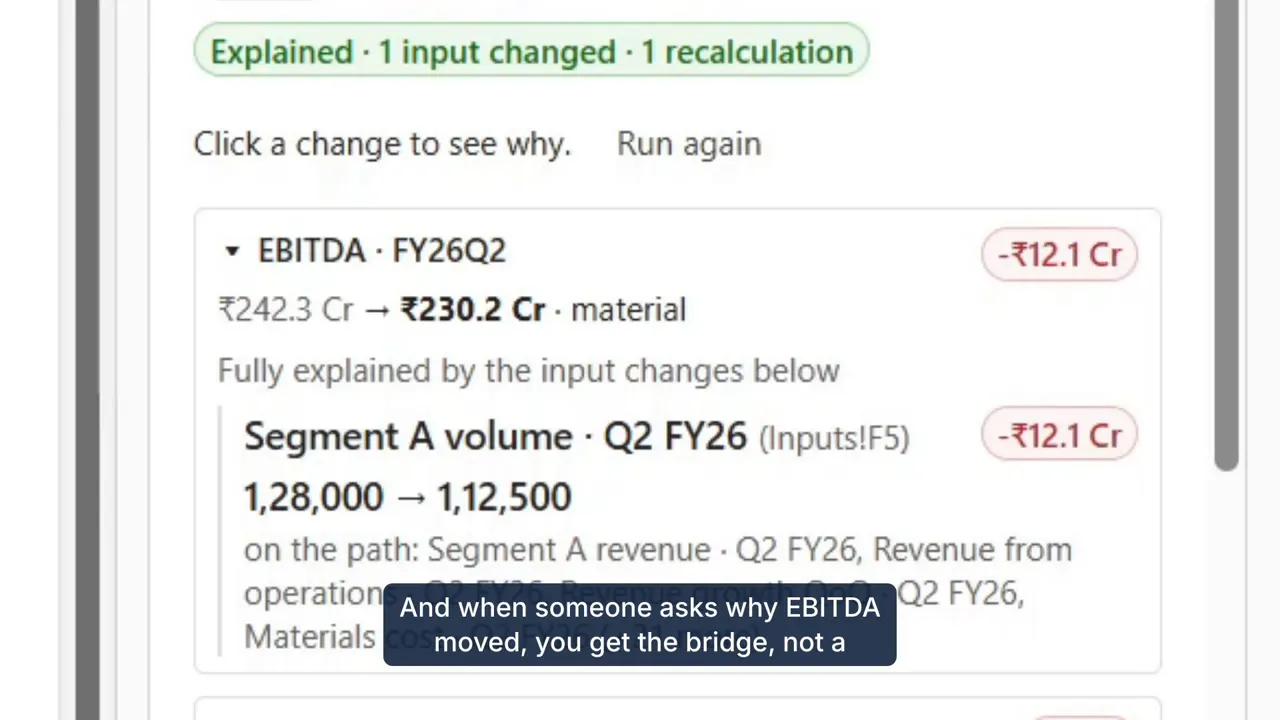
Explain why in Excel: EBITDA fell, fully explained by Segment A volume.
From the launch video: Changes, then Explain why

Explain why a number moved

The Changes tab compares two versions, and Explain why reruns the model in Excel with each changed input put back to name the driver. No AI is involved.

  • Excel
  • MIDMEN works as a connector in Claude, with sign-in by emailed code.
  • PDF evidence, with a picture of the printed line.

  • The core: Connect and Publish in Excel; live numbers and checked sentences in Word and PowerPoint; Fix and Approve.